APL: A Practical Introduction
Type-forward, information-dense APL basics: core ideas, glyphs, examples, outputs.
What APL Is
APL is an array language: operators work on scalars and arrays without explicit loops. You describe whole transformations, not steps.
Reading is right-to-left: a function applies to the argument on its right. After a few hours, this feels direct and mathematical.
Arrays First (Core Idea)
APL treats every value as a scalar or array. That single idea drives most of its power.
⍳5           ⍝ 1 2 3 4 5
3⍴1          ⍝ 1 1 1
(1 2 3)+10   ⍝ 11 12 13
+/1 2 3 4    ⍝ 10
No loops. The operators already know how to work element‑wise or reduce across an array.
Glyphs at a Glance (Most Used)
Full Glyph Reference (Print-Ready)
| Glyph | Name | Use | Example → Output |
|---|---|---|---|
| + | Add | Element-wise add | 1 2 3 + 10 → 11 12 13 |
| − | Subtract | Element-wise subtract | 10 − 3 → 7 |
| × | Multiply | Element-wise multiply | 3 × 4 → 12 |
| ÷ | Divide | Element-wise divide | 10 ÷ 4 → 2.5 |
| * | Power | Exponentiation | 2 * 3 → 8 |
| | | Absolute | Magnitude | |¯5 → 5 |
| ⌊ | Floor | Round down | ⌊3.7 → 3 |
| ⌈ | Ceiling | Round up | ⌈3.2 → 4 |
| = | Equal | Comparison | 3 = 3 → 1 |
| ≠ | Not equal | Comparison | 3 ≠ 4 → 1 |
| < | Less than | Comparison | 3 < 5 → 1 |
| > | Greater than | Comparison | 5 > 3 → 1 |
| ≤ | Less or equal | Comparison | 3 ≤ 3 → 1 |
| ≥ | Greater or equal | Comparison | 5 ≥ 5 → 1 |
| ≡ | Match | Exact match | 1 2 3 ≡ 1 2 3 → 1 |
| ≢ | Not match | Not exact match | 1 2 3 ≢ 1 2 4 → 1 |
| ⍳ | Iota | Generate 1…n | ⍳5 → 1 2 3 4 5 |
| ⍴ | Rho | Shape / reshape | 3⍴1 → 1 1 1 |
| , | Ravel | Flatten | ,1 2 3 → 1 2 3 |
| ⌽ | Reverse | Reverse array | ⌽1 2 3 → 3 2 1 |
| ↑ | Take | Take first n | 2↑⍳5 → 1 2 |
| ↓ | Drop | Drop first n | 2↓⍳5 → 3 4 5 |
| / | Reduce | Fold with function | +/1 2 3 4 → 10 |
| \ | Scan | Prefix reduction | +\1 2 3 → 1 3 6 |
| ⍷ | Find | Pattern search | 'ab' ⍷ 'abc' → 1 0 0 |
| ⊂ | Enclose | Box array | 1 0 1 0 1 ⊂ 'abcde' → [ab] [cd] [e] |
| ⊃ | Disclose | Pick from box | 1 ⊃ 'hello' → h |
| ⍕ | Format | To string | ⍕123 → 123 |
| ⎕UCS | Unicode | Code ↔ char | ⎕UCS 'A' → 65 |
| ⎕JSON | JSON | Encode/Decode | ⎕JSON 1 2 3 → [1,2,3] |
This table is designed to print cleanly. Use browser print to PDF.
Keyboard + Input (Compact Guide)
APL is fastest with a real APL keyboard layout. Install one, print the keymap, and learn the modifier layer.
| Platform | Fast Path | Fallback |
|---|---|---|
| macOS | Add an APL input source (Dyalog/Unicode). Toggle with Globe or Control+Space. | Unicode Hex Input for one‑offs; copy/paste glyphs from this page. |
| Windows | Install an APL keyboard layout; use AltGr layer for glyphs. | IME/clipboard glyph palette or compose via custom layout. |
| Linux | IBus/SCIM/XKB APL layout or a Compose key map. | Compose sequences or paste from a glyph table. |
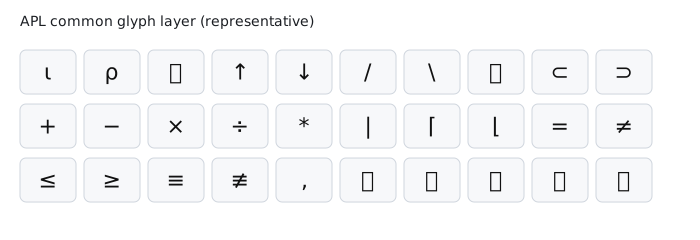
Tip: keep a printed keymap near your keyboard for the first week. Muscle memory appears quickly.
Examples + Outputs
+\1 2 3 41 3 6 10v ← 10 20 30 40 50
(v ≥ 30) / v30 40 502 3⍴⍳61 2 3
4 5 63↑⌽⍳77 6 51 2 3 ≡ 1 2 31Strings + JSON Edge Cases
'hello' ⍷ 'hello world'1 0 0 0 0 0 0 0 0 0 01 ⊃ 'hello'h1 0 1 0 1 ⊂ 'abcde'[ab] [cd] [e]⎕JSON 'hi'"hi"0 ⎕JSON '"hi"'hiPython / NumPy → APL
| Intent | Python / NumPy | APL | Notes |
|---|---|---|---|
| Range 1..n | np.arange(1, n+1) |
⍳n |
APL defaults to 1-based |
| Element-wise add | a + b |
a + b |
Same operator |
| Reshape | a.reshape(2,3) |
2 3⍴a |
Shape is left argument |
| Sum | a.sum() |
+/a |
Reduce with + |
| Cumulative sum | np.cumsum(a) |
+\a |
Scan with + |
| Reverse | a[::-1] |
⌽a |
Single glyph |
| Take / head | a[:n] |
n↑a |
n on the left |
| Drop / tail | a[n:] |
n↓a |
n on the left |
| Boolean filter | a[a > 0] |
(a > 0) / a |
Mask used as filter |
| Find substring | "ab" in s |
'ab' ⍷ s |
Returns a boolean mask |
K9-Specific Examples
Outputs shown match K9 test coverage.
⎕UCS 'A'65⎕UCS 65 66 67ABC⎕JSON 1 2 3[1,2,3]0 ⎕JSON '[1,2,3]'1 2 3⎕TRAP←(3 'C' '⎕DMX') ⋄ ⎕UCS ¯13APL One‑Page Cheat Sheet (Print‑Ready)
Optimized for a single printed page. Use browser print to PDF or open the standalone cheat sheet: cheat-sheet.html.
Array Basics
⍳nGenerate 1…n⍴AShape of Am n⍴AReshape A,ARavel (flatten)A,BCatenateStructural
n↑ATaken↓ADrop⌽AReverse⊂AEnclose⊃ADisclose / pickArithmetic
A+BElement‑wise addA×BElement‑wise multiplyA÷BElement‑wise divide|AAbsolute value⌈A / ⌊ACeiling / floorReductions
+/ASum×/AProduct⌈/AMax⌊/AMin+\APrefix sumsComparisons
A=BEqualA≠BNot equalA<B / A>BLess / greaterA≤B / A≥BLess‑eq / greater‑eqA≡BMatchStrings + I/O
S ⍷ TFind substring⍕AFormat to string⎕UCS AUnicode codepoints⎕JSON AEncode JSON0 ⎕JSON SDecode JSONIdioms
(A>0)/AFilter by mask⌽⍳nReverse range2 3⍴⍳6Matrix+/AReduce with ++\AScan with +Getting Started
- Install an APL keyboard layout or input method for glyph entry.
- Use a font with APL glyph coverage (IBM Plex, Noto Symbols, dedicated APL fonts).
- Start with reshape, reverse, reduce, scan, and masking.
- Read right-to-left and focus on array transforms.
This intro is compact on purpose. It’s a base for deeper sections on functions, tacit programming, namespaces, and performance.